
The latest update of android support library came out with an interesting new layout: SwipeRefreshLayout. This layout implements the pull-down-to-refresh pattern. In this tutorial, I will show you how to create a SwipeRefreshLayout with a ListView 🙂
Important Note:
Support library project must be imported to our workspace and added to our main project as a library.
First, we will define our SwipeRefreshContainer:
activity_main.xml
Now, we will apply the code and implement OnRefreshListener to do the pull-down-to-refresh effect.
MainActivity.java
package com.example.swiperefreshlayout;

import java.util.ArrayList;
import java.util.Arrays;

import android.annotation.SuppressLint;
import android.os.Bundle;
import android.os.Handler;
import android.support.v4.widget.SwipeRefreshLayout;
import android.support.v4.widget.SwipeRefreshLayout.OnRefreshListener;
import android.support.v7.app.ActionBarActivity;
import android.util.Log;
import android.widget.ArrayAdapter;
import android.widget.ListView;

public class MainActivity extends ActionBarActivity implements OnRefreshListener {

	private static final String TAG = MainActivity.class.getSimpleName();
	private static int REFRESH_TIME_IN_SECONDS = 5;
	SwipeRefreshLayout swipeRefreshLayout;
	ListView listView;

	ArrayList listPhones = new ArrayList(
			Arrays.asList("Nexus 5", "iPhone 5s", "HTC One M8", "Lumia 1030", "Galaxy S5", "LG G2"));

	@Override
    protected void onCreate(Bundle savedInstanceState) {
        super.onCreate(savedInstanceState);
        setContentView(R.layout.activity_main);
        initUI();

    }

	@SuppressLint("InlinedApi")
	@SuppressWarnings("deprecation")
	private void initUI() {
		swipeRefreshLayout = (SwipeRefreshLayout) findViewById(R.id.lySwipeRefresh);
		swipeRefreshLayout.setOnRefreshListener(this);
		swipeRefreshLayout.setColorScheme(android.R.color.holo_blue_bright,
		        android.R.color.holo_green_light,
		        android.R.color.holo_orange_light,
		        android.R.color.holo_red_light);
		listView = (ListView) findViewById(R.id.listview);
		ArrayAdapter arrayAdapter = new ArrayAdapter(this,
				android.R.layout.simple_list_item_1, listPhones);
		listView.setAdapter(arrayAdapter);
	}
	@Override
	public void onRefresh() {
		Log.d(TAG, "onRefresh SwipeRefreshLayout");
		new Handler().postDelayed(new Runnable() {
			@Override
			public void run() {
				stopSwipeRefresh();
			}
		}, REFRESH_TIME_IN_SECONDS * 1000);
	}
	private void stopSwipeRefresh() {
		swipeRefreshLayout.setRefreshing(false);
	}

}
Output:
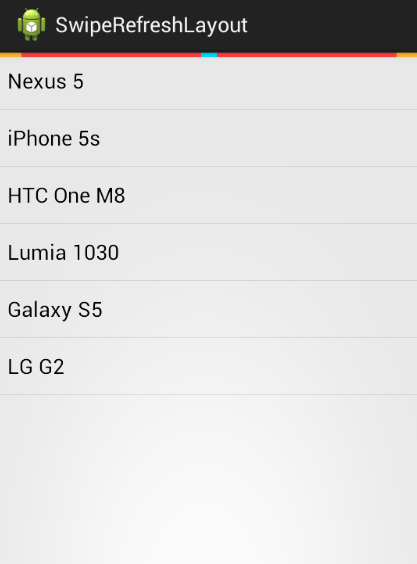
SwipeRefreshLayout
And now that’s it, we have already set up a SwipeRefreshLayout with a Listview. Thank you for visiting my blog 🙂


